manage tag_group table More...
 Inheritance diagram for Tag_Group_MTable:
 Collaboration diagram for Tag_Group_MTable:
Public Member Functions | |
| __construct (Tag_Group_SQL $p_obj) | |
| input () | |
| display into a dialog box the datarow in order to be appended or modified. | |
| input_tag () | |
| Display a select widget for adding new tag. | |
| Public Member Functions inherited from Manage_Table_SQL | |
| __construct (Data_SQL $p_table) | |
| add_json_param ($p_attribute, $p_value) | |
| Add json parameter to the current one. | |
| ajax_delete () | |
| Delete a record and return an XML answer for ajax. | |
| ajax_input ($p_status="OK") | |
| send an xml with input of the object, create an xml answer. | |
| ajax_save () | |
| Save the record from Request into the DB and returns an XML to update the Html Element. | |
| can_append_row () | |
| return false if the append of the row is forbidden | |
| can_delete_row () | |
| return false if the delete of the row is forbidden | |
| can_update_row () | |
| return false if the update of the row is forbidden | |
| check () | |
| count_error () | |
| returns the nb of errors found | |
| create_js_script () | |
| we must create first the javascript if we want to update, insert or delete rows. | |
| delete () | |
| delete a datarow , the id must be have set before | |
| display_error () | |
| Display a list of the error collected. | |
| display_icon_custom ($p_row) | |
| usually contain a link and calls another page, it must be overriden | |
| display_icon_del ($p_row) | |
| display_icon_mod ($p_row) | |
| display_row ($p_row) | |
| display a data row in the table, with the order defined in a_order and depending of the visibility of the column, all the rows contains the attribute ctl_pk_id , to retrieve in javascript , ie with the function afterSaveFct (see managetable.js) | |
| display_row_custom ($p_key, $p_value, $p_id=0) | |
| When displaying a row, if a column has the type "custom" , we can call this function to display properly the value including the tag "<td>". | |
| display_table ($p_order="", $p_array=NULL) | |
| display the data of the table | |
| display_table_header () | |
| display the column header excepted the not visible one and in the order defined with $this->a_order | |
| execute_query ($p_order="", $p_array=NULL) | |
| execute the query (Data_SQL.seek), called by display_table | |
| from_request () | |
| get the data from http request strip the not update or not visible data to their initial value. | |
| get_button_add_top () | |
| get_col_option ($p_key) | |
| add extra to column, normally class , javascript or style | |
| get_col_sort () | |
| When adding an element , it is column we checked to insert before,. | |
| get_col_type ($p_key) | |
| return the type of a column | |
| get_current_pos ($p_key) | |
| get the position of a column | |
| get_current_row () | |
| Return the current row printed in display_row. | |
| get_dialog_box () | |
| get_dialogbox_style () | |
| return the db_style | |
| get_error ($p_col) | |
| retrieve the error message | |
| get_header_option ($p_key) | |
| add extra to column Header, normally class , javascript or style | |
| get_icon_del () | |
| get_icon_mod () | |
| get_js_variable () | |
| Get the object name. | |
| get_json () | |
| get_object_name () | |
| get_order () | |
| get_property_updatable ($p_key) | |
| return True if the column is updatable otherwise false | |
| get_property_visible ($p_key) | |
| return True if the column is visible otherwise false | |
| get_search_table () | |
| Get if we can search in the table. | |
| get_sort_column () | |
| return the column to sort | |
| get_table () | |
| getCssClass () | |
| getTitle () | |
| input_custom ($p_key, $p_value) | |
| this function let you create your own input , for example for a ITEXT , a IRADIO , ... it must be override , there is not default | |
| insert () | |
| insert a new value | |
| move ($p_key, $p_idx) | |
| if we change a column order , the order of the other columns is impacted. | |
| param_set ($p_json) | |
| Set the parameter of the object (gDossier, ac, plugin_code...) @detail By default , only gDossier will be set . | |
| save () | |
| save the Data_SQL Object The noalyss_SQL is not empty | |
| send_header () | |
| send the XML headers for the ajax call | |
| set_append_row ($p_value) | |
| Enable or disable the appending of rows. | |
| set_button_add_top ($button_add_top) | |
| set_callback ($p_file) | |
| set the callback function that is passed to javascript | |
| set_col_label ($p_key, $p_display) | |
| set the name to display for a column | |
| set_col_option ($p_key, $p_value) | |
| add extra to column, normally class or style | |
| set_col_sort ($p_num) | |
| When adding an element ,we place it thanks the DOM Attribute sort_value set it to -1 if you want one to append. | |
| set_col_tips ($p_key, $p_comment) | |
| Set the info for a column, use Icon_Action\infobulle the message are in message_javascript.php. | |
| set_col_type ($p_key, $p_value, $p_array=NULL) | |
| set the type of a column , it will change in the input db box , the select must supply an array of possible values [val=> , label=>] with the variable $this->key_name->a_value | |
| set_current_row ($current_row) | |
| set the current row printed in display_row | |
| set_delete_row ($p_value) | |
| Enable or disable the deletion of rows. | |
| set_dialog_box ($dialog_box) | |
| set_dialogbox_style ($db_style) | |
| Dialog box style , by default {position: "fixed", top: '15', width: "auto", "margin-left": "20%"}. | |
| set_error ($p_col, $p_message) | |
| set the error message for a wrong input | |
| set_header_option ($p_key, $p_value) | |
| add extra to column Header, normally class or style | |
| set_icon_del ($pString) | |
| Set the icon to delete at the right or left of the row. | |
| set_icon_mod ($pString) | |
| Set the icon to modify at the right ,the first col or left of the row, if the mod if custom , you have to override the function display_icon_custom. | |
| set_json ($p_json) | |
| Set the parameter of the object (gDossier, ac, plugin_code...) @detail By default , only gDossier will be set . | |
| set_object_name ($p_object_name) | |
| Set the object_name. | |
| set_order ($p_order) | |
| set_pk ($p_id) | |
| set the id value of a data row and load from the db | |
| set_property_updatable ($p_key, $p_value) | |
| set a column of the data row updatable or not | |
| set_property_visible ($p_key, $p_value) | |
| set a column of the data row visible or not | |
| set_search_table ($search_table) | |
| Set the table searchable or not. | |
| set_sort_column ($p_col) | |
| set the column to sort by default | |
| set_table (Data_SQL $p_noalyss_sql) | |
| set_update_row ($p_value) | |
| Enable or disable the updating of rows. | |
| set_value ($p_key, $p_value) | |
| setCssClass ($p_class) | |
| setTitle ($p_title) | |
| Set the title of the diabox , default is Donnée. | |
| show_error ($p_col) | |
| update () | |
Additional Inherited Members | |
| Static Public Member Functions inherited from Manage_Table_SQL | |
| static | ajax_error ($p_message) |
| returns an XML object for error message as unauthorized access. | |
| Data Fields inherited from Manage_Table_SQL | |
| const | UPDATABLE =1 |
| const | VISIBLE =2 |
| Protected Attributes inherited from Manage_Table_SQL | |
| $a_col_option | |
| in display_row and display_custom_row, it is the current row which is used | |
| $a_header_option | |
| Extra to add to the column Header : CSS Style , CSS class, javascript ,... | |
| $a_info | |
| Array with the infotip. | |
| $a_label_displaid | |
| Label of the col. of the datarow. | |
| $a_order | |
| order of the col | |
| $a_prop | |
| property for each col. | |
| $a_select | |
| Possible value if a_type is a SELECT. | |
| $a_type | |
| Type of the column : date , select ... Only in input. | |
| $aerror | |
| Array containing the error of the input data. | |
| $button_add_top | |
| place of the button add on the top, by default true | |
| $callback | |
| Callback function. | |
| $col_sort | |
| when inserting, it is the column to sort,-1 to disable it and append only | |
| $cssclass | |
| < give the title of the diabox , default is Data | |
| $current_row | |
| CSS class for the dialog box. | |
| $dialog_box | |
| ID of the dialog box which display the result of the ajax calls. | |
| $dialogbox_style | |
| style of the dialog box | |
| $icon_del | |
| place of right or left the icon update or mod, default right, accepted value=left,right | |
| $icon_mod | |
| place of right or left the icon update or mod, default right, accepted value=left,right,first,custom column for mod | |
| $json_parameter | |
| Default parameter to add (gDossier...), sent to the ajax callback. | |
| $object_name | |
| Object_name is used for the javascript , it is the row id to update or delete. | |
| $row_append | |
| Flag to indicate if rows can be added. | |
| $row_delete | |
| Flag to indicate if rows can be deleted. | |
| $row_update | |
| Flag to indicate if rows can be updated. | |
| $search_table | |
| boolean , by default true ,it is possible to search in the table, | |
| $sort_column | |
| javascript sort on this column , if empty there is no js sort | |
| $table | |
| Object Data_SQL. | |
| $title | |
Detailed Description
manage tag_group table
Definition at line 38 of file tag_group_mtable.class.php.
Constructor & Destructor Documentation
◆ __construct()
| Tag_Group_MTable::__construct | ( | Tag_Group_SQL | $p_obj | ) |
Definition at line 41 of file tag_group_mtable.class.php.
References _, Manage_Table_SQL\set_col_label(), Manage_Table_SQL\set_property_updatable(), and Manage_Table_SQL\set_property_visible().
Here is the call graph for this function: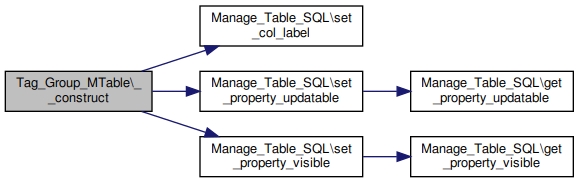
Member Function Documentation
◆ input()
| Tag_Group_MTable::input | ( | ) |
display into a dialog box the datarow in order to be appended or modified.
Can be override if you need a more complex form or add elements with "set_order" before calling this function. This function does not add the form , only the table.
It returns true , if it is not readyonly and the form will have a "save" button, if it returns nothing or false then there is no save button, nor form, the content is then readonly
Reimplemented from Manage_Table_SQL.
Definition at line 49 of file tag_group_mtable.class.php.
References input_tag().
Here is the call graph for this function: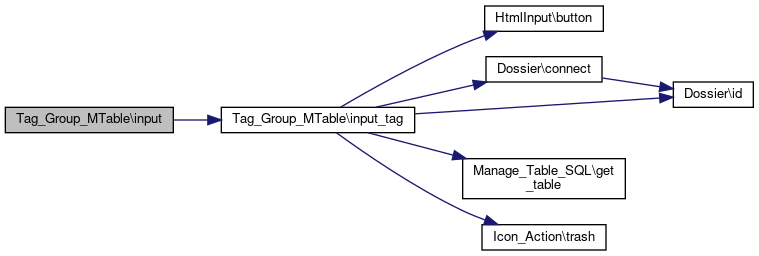
◆ input_tag()
| Tag_Group_MTable::input_tag | ( | ) |
Display a select widget for adding new tag.
Definition at line 64 of file tag_group_mtable.class.php.
References $aTag, $cn, $dossier_id, $i, $js, $nb, $select, _, Manage_Table_SQL\get_table(), and Icon_Action\trash().
Referenced by input().
Here is the call graph for this function: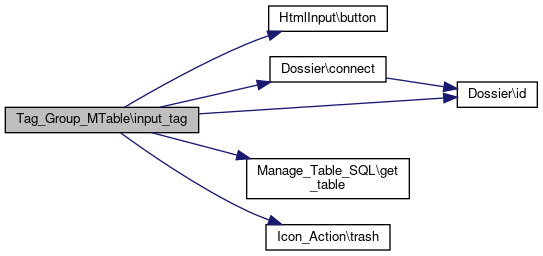
The documentation for this class was generated from the following file:
- include/class/tag_group_mtable.class.php
Generated on Thu Jan 15 2026 10:14:41 for noalyss by
 1.13.2